Hey there, Community friends! 👋
We know it’s not fun when someone breaks the House Rules, posting spam, rude comments, or even tagging you without permission. It can really spoil the good vibes. 😕 But guess what? You don’t have to see those posts ever again!
Let us show you how to use the Ignore List, your simple tool for keeping the Community friendly and fun! 💖
Check my Ignore List
🛠 How to Add Someone to Your Ignore List:
- Click your profile picture at the top right of the screen.
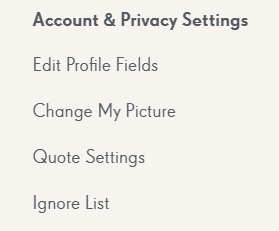
- Select “Account & Privacy Settings.”
- Scroll down and tap on “Ignore List.”
- Go to the post or comment by the user you want to ignore.
- Copy their username (without the @ symbol ), paste it into the Ignore List, and click OK.
Ta-da! You’ve now ignored that user. You won’t see their comments or discussions anymore, and they won’t be able to tag or notify you.
⚠️ Good to Know:
- You can ignore up to 5 users at once.
- Want to remove someone from your Ignore List? Just hit Unignore next to their name, and they’ll be removed.
- Once unignored, you’ll start seeing their posts again and receive notifications if they mention you.
💬 Remember: If someone is being really inappropriate or breaking the rules, please report them to a Community Manager so we can take action. 🛡
Let’s keep this space kind, safe, and full of fun for everyone! 🌈 Thanks for helping make our Community a sweet place to be. 🍬