Chat about Candy Crush Saga, share thoughts, news, or anything sweet!
Support - Stuck or having an issue? Ask a question and get help from other players!
Enter for a chance to win Gold Bars and sweet in-game rewards in Candy Crush Saga!
This is your chill zone! Talk about anything that’s not Candy-related with other Candy players!.
Have a sweet suggestion? Share your ideas to help improve Candy Crush Saga.
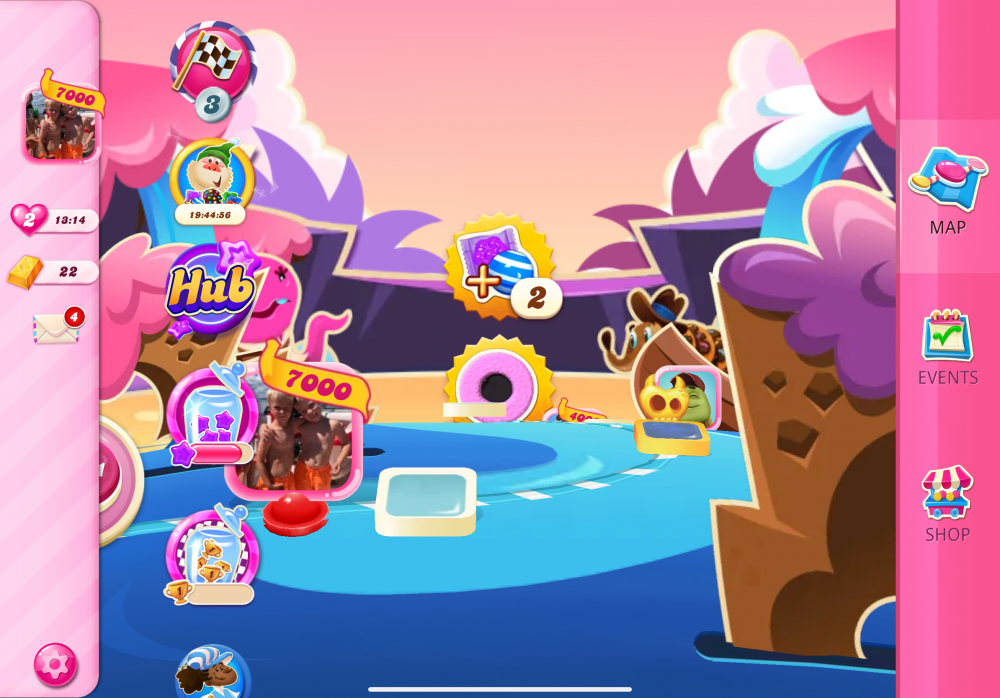
I am on level 7542 given the choice to go a different route for 5 levels to get bonuses, but when I go that way it won’t allow me to play, just a blank square at each level
Sign in or register to leave a comment and join the conversation.
Thank you very much for your input, Girls @christinewupp , @Carol-38 and @MannyFae🙏
And, @MannyFae, Thanks a lot for other links too💜
Unfortunately PummyRaj, like a lot of other things I have never had the experience of Adventure Path so I am unable to comment 🙃 sorry.
Although I had the Adventure Path, I didn't encounter this particular problem, so I don't have any suggestions. I found two more complaints about this:
One post has a screenshot in portrait mode, so the glitch is likely not related to screen orientation.
I only had the adventure path a few months ago. There was no problem with it in my game, but yes I did try to play Adventure path in landscape mode as well one day but could not access it as it was off the screen, so when that happened I had to close the app and reopen it in portrait mode and it worked fine after that.
Hi @christinewupp , @MannyFae , @Rhonda_L , @Carol-38🤗
Did any of you had Adventure Path? If so, did you see this glitch while you were playing?
Do you have any tips for @donnv ?
Hello @donnv🤗 A Warm Welcome to our sweet King Community!
What you are playing now is called "Adventure Path", a special series of levels that is not the part of regular map! I do not know much about it as I did not have it in my game!
I have noticed that you are playing the game in "landscape" mode! Did you try to turn your device to Portrait mode and see if it works?
Did you make sure that your game App is updated with the latest version?
Also, please try logging out of the game -- closing the App -- restart your device after shutting it down for few minutes;
If nothing worked, what you have stumbled on is must be a glitch! I cannot report to our Community In-charge as they won't be here until Monday. Hence, I would suggest you to contact the King Player Support team and send them a complaint.
** You will be receiving an automated email. Send a reply to it immediately and explain the issue and provide the screenshots also.
Hope the issue will be resolved and you will be able to play the game again soon🤞