Chat about Candy Crush Saga, share thoughts, news, or anything sweet!
Support - Stuck or having an issue? Ask a question and get help from other players!
Enter for a chance to win Gold Bars and sweet in-game rewards in Candy Crush Saga!
This is your chill zone! Talk about anything that’s not Candy-related with other Candy players!.
Have a sweet suggestion? Share your ideas to help improve Candy Crush Saga.
Can you please help to save my progress cause I have a new device my progress was at level2153
Sign in or register to leave a comment and join the conversation.
Hi and Welcome to the King Community
Getting a new phone or tablet is always exciting! But before you can dive in, you’ll need to set everything up. Transferring your game progress depends on how it was saved on your old device, but don’t worry—we’re here to help. Follow these steps to transfer your progress and you'll be back enjoying the game in no time. Let’s get started!
If your progress is backed up on iCloud or Android Cloud, you can restore it automatically on a new phone or tablet that uses the same OS account as your old device. By signing in with the same iOS or Android account on both devices, you can pick up the game right where you left off—no need to log into your King or Facebook account! Note: This option is available only for players using version 1.281 or higher, and who have been active in the game after December 18, 2024. If you didn't back up your progress on the Cloud, or you're playing on a Windows app or an Amazon device, no problem—we have some other options for you:
If you’ve connected your game to a King account or to Facebook, simply install the game on your new device and log in. That’s it! All your game progress and Gold Bars will appear automatically.
If this is the case, follow the simple steps below to save your progress before moving to your new device:
1. Open the game on your old device.
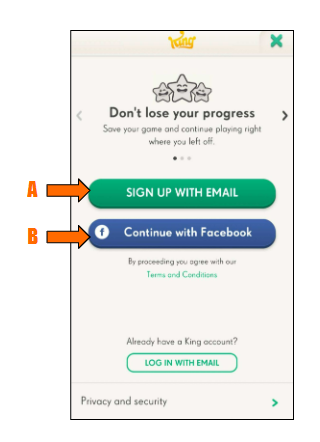
2. Back up your progress by connecting to Facebook or creating a King account. Here's how:
Option A: Create a King account:
Option B: Connect the game to your Facebook account:
3. Install the game on your new device.
4. Open the game on your new device, and log in:
Now you're good to go! All your game progress and Gold Bars should be transferred to your new device!
Connecting to Facebook or the Kingdom lets you to synchronize your progress with our game servers. ensuring that your progress and Gold Bars are transferred across all your devices.
If, for some reason, the progress and Gold Bars do not transfer, select Contact Us at the bottom of this page, and we will help you get them back.
Boosters, Extra Lives, and Extra Moves are saved locally on the device where you received them and are not stored on our servers. This means that, unlike Gold Bars and your level progress, they won't transfer across to your new device.
The good news is that if you still have access to the old device, everything will still be there! Why not head on back over and use up those Boosters to power through some levels before switching to your new device?
We never recommend storing too many free Boosters on your device; not only is there a chance they may be lost, but they can also affect gameplay.
We offer plenty of ways to get free Boosters every day, so there's no need to stockpile them. Put them to good use and have fun tackling those tricky levels!