Chat about Candy Crush Saga, share thoughts, news, or anything sweet!
Support - Stuck or having an issue? Ask a question and get help from other players!
Enter for a chance to win Gold Bars and sweet in-game rewards in Candy Crush Saga!
This is your chill zone! Talk about anything that’s not Candy-related with other Candy players!.
Have a sweet suggestion? Share your ideas to help improve Candy Crush Saga.
@QueenB @LoFiGummy @Snow_Rider
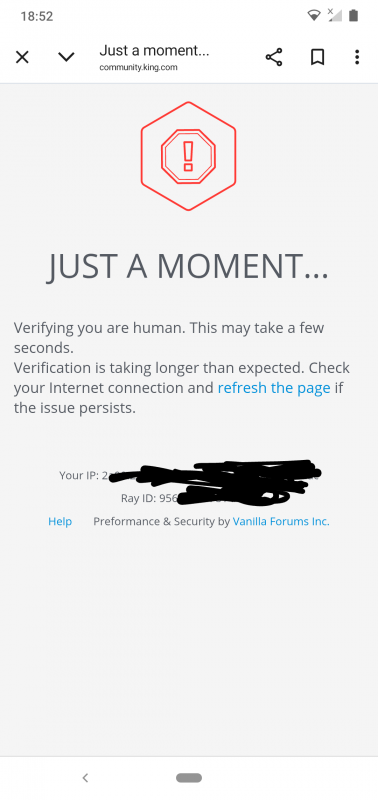
It took me ages to access the forum this evening due to the issue shown below.
Sign in or register to leave a comment and join the conversation.
I wanted to check my bookmarks and noticed that not a single one is left. I know that the community has undergone many changes. But it can't be that all the bookmarks have disappeared, since these posts are still here.
And then I tried this with the filter. My language is German and it was set for translation. Then you turn on the filter. First in English and then to open it further. See the picture.
Thanks @Alienscar ⭐⭐⭐⭐⭐
⭐⭐⭐⭐⭐ for @Alienscar ☺️
@Carol-38
Click on bookmarks
Latest announcements appear
Scroll page
KEEP SCROLLING
Eventually your bookmarks will appear
Hi @QueenB these are the two places I click on Bookmarks
And this is what I get fom both
So am I doing something wrong 🤔
Hi Carol,
Sorry for the delay getting back to you on this. We haven’t been able to reproduce an issue with bookmarks disappearing so far.
Since we added the Latest Announcements section, those announcements are now appearing above the bookmarks list as well. So when you go to your avatar → Bookmarks, you may need to scroll past all of the Latest Announcements before your saved bookmarks appear underneath.
Could you please try that once more for me? If you still don’t see your bookmarks, could you send me a screenshot after you’ve scrolled all the way past the Latest Announcements? That will help me see exactly what is appearing on your screen.
If the bookmark list genuinely isn’t there at all, then we’re looking at a different issue and I can investigate that further.
So have you all given up @FluffyDinosaur @QueenB I still can't get into my bookmarks, which is really unhelpful. Is it being looked into, or is that the way it is now, we just muddle our way through the Community, do the best we can and try to stay positive 🤔😢
I can see the heading Bookmarks right at the bottom of this page, and I had already tried that days ago @QueenB. But it opens up the same as what I showed in my previous post 🤕 there is no way I can access my Bookmarks. Also I have to open my profile to get to my Posts, the only thing that works is Drafts.
Hi @Carol-38 ,
Sorry for the delay getting back to you!
Could you do me a quick favor and scroll a little further down to see if your Bookmarks appear there? They should be showing below the announced posts.
We know the current layout isn’t ideal and the team is working on improving it, but for now your bookmarks should still be there further down the page.
Let me know if you can see them once you scroll 😊
Hi @FluffyDinosaur @QueenB didn't get an answer to my post ⬆️ maybe the tagging is playing up again 🤔
Tried again many times to go into my bookmarks and keep getting ⬇️ And for anyone looking that isn't my Events board 🙄
Hi @FluffyDinosaur @QueenB not sure what is happening, but for the past 2 days when I click on my bookmarks or posts, I get taken to ⬇️
I can go into my profile and see my posts, but of course not bookmarks. Any ideas 🤔
Seems to be fixed for me as well @FluffyDinosaur but to be honest the issue didn't seem to affect me that often.
Terrific! Yes, it’s fixed.Thanks @FluffyDinosaur, it’s great to see the back if that particular glitch.
@FluffyDinosaur
I keep getting error messages with code 500 for this page, whether I'm trying to send a comment or open the website, etc.
Even when I go into a post, the pages are at the back and it's not the first page. With the latest comments.
I rather have the feeling that it's getting worse rather than better. Sorry.
Thank you for letting me know about the 503 issue and that the issue with drafts seemed to be solved, that's great news 🎉 I know there's been some outages and 503 and 505 issues lately - and we're working on this as well! Now, let's hope we soon have a solution for the issue with the pages.
Hi @FluffyDinosaur It does seems fixed for me now, thanks!
Well that's strange @FluffyDinosaur I did my last post, posted it and got
My post wasn't showing so I closed the Community, came back in and saw my post had actually posted. So testing to see what this one does.
Editing to say this worked fine, and no drafts showing 👍
As far as I can see @FluffyDinosaur it seems to be good for me 👏👏
Now let's get the awful problem of pages opening on any page other than 1 fixed 🤞🤞
I know you'll get notified of this @Alienscar being as it's your thread. Tagging @christinewupp in case you're out and about today and not checking in.
Hi everyone,
A new fix for the issue where drafts are saved despite being published should now be rolled out. Could you help me confirm if it is fixed or if you are still experiencing the issue?
@QueenB
Today, there are again problems with loading the King.com page and the comments. GATAWAY came up again. All the pages on my PC are working, but this page is difficult again today.