Chat about Candy Crush Saga, share thoughts, news, or anything sweet!
Support - Stuck or having an issue? Ask a question and get help from other players!
Enter for a chance to win Gold Bars and sweet in-game rewards in Candy Crush Saga!
This is your chill zone! Talk about anything that’s not Candy-related with other Candy players!.
Have a sweet suggestion? Share your ideas to help improve Candy Crush Saga.
My game progress is only linked to iOS game center and I want to also be able to play my game (same progress) on PC, I am unable to see any option to link my account to a king.com account!
Sign in or register to leave a comment and join the conversation.
Any thoughts on this ?
Hello PummyRaj I used to sign in with apple account and on PC I only newly downloaded the app via Windows App. (I have created like two or even three new king account while trying to see if I can connect my Mobile device progress to it)
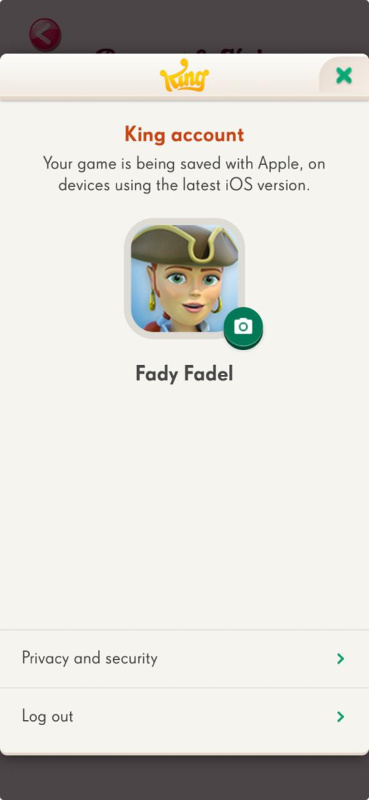
Below is the screenshot when I go to my account settings from my apple device:
Hello @FeDuZ🤗 Welcome to the King Community!
I am sorry to hear that you are experiencing issue with linking your game progress!
Can you please clarify something for me? On your Apple device, did you log in with a King account or Apple account? And, on your PC - are you trying to play the game through Facebook browser or the Windows App version?
In one of your previous comments, you said "you are supposed to see 'connect'! But, all you see is 'log out'! Can you please tell me where you see this? Would you mind sharing a screenshot of this for me?
Thank you & talk to you soon🍫🍬🍫
Any luck with anyone ?
The issue is, I have tried to create a new King account because i never had one, but there is no option to connect my mobile device with the new created account, also I will not be able to use facebook because I found out I already have an old progress (lower level than my iOS), unless if there is a way to override my Facebook progress, I have already searched and tried a bunch of solutions but non gave me the option they present, that after I login with my game on my iOS device > Account Settings > 'I should see connect' , all I see is "Log out". Appreciate an advice.
Hi and Welcome to the King Community
To link your iOS device to your PC for Candy Crush, you must log into the same King or Facebook account on both the iOS app and the PC version. Once you are logged in with the same account on both, your progress will automatically sync.
Please also check this page for more info Here