Chat about Candy Crush Saga, share thoughts, news, or anything sweet!
Support - Stuck or having an issue? Ask a question and get help from other players!
Enter for a chance to win Gold Bars and sweet in-game rewards in Candy Crush Saga!
This is your chill zone! Talk about anything that’s not Candy-related with other Candy players!.
Have a sweet suggestion? Share your ideas to help improve Candy Crush Saga.
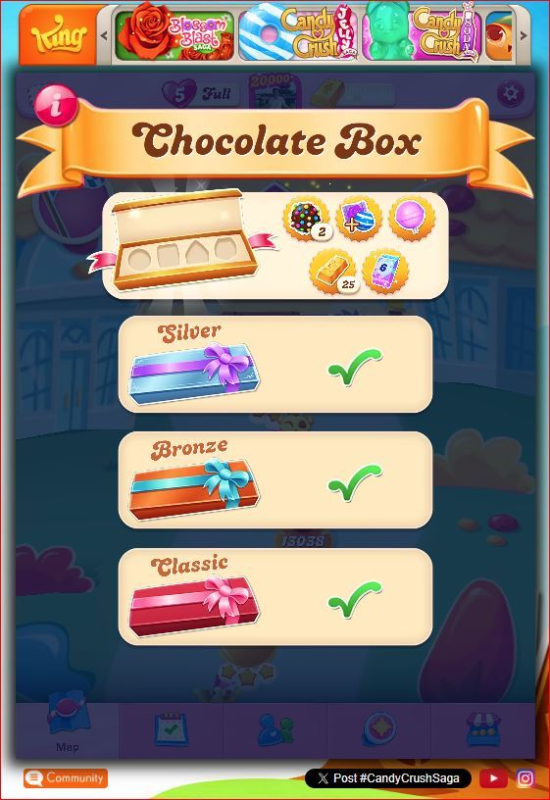
Candy crush always stop at chocolate box and couldn't clear
Sign in or register to leave a comment and join the conversation.
Yes it might be @quekkc as that is one of the current issues affecting the Chocolate Box. There is also the issue of completing a task freezing the game and the issue of the Chocolate Box being unresponsive.
I managed to avoid this pop-up by restarting the game
Yes, as I said restarting the game can resolve some of the Chocolate Box issues, but some of the issues can't be solved by restarting and you find that even when you restart the frozen Box reappears. It appears only King can really solve this issue but they are now hiding behind their support bot, Kingsley.
I managed to avoid this pop-up by restarting the game and clicked "Play" as soon as it appeared. What I did earlier on was wait for a few seconds before clicking "Play" so that it opens at the last played level. However, when I press the "Back" button and then press "Play" again, the same screen pops up.
Anyway, I was able to suppress the "Chocolate Box" pop-up by using another phone with an older CCS version to start playing the chocolate box. Once you have started filling the task, the other devices will not have this pop-up. At least for the time being.
I am not sure if this screen is what she meant. For the first time I am getting this today. There is no way of getting out of this screen to play the game. Previously there is a left arrow on the top left corner where you can click to exit this screen. the same thing happens on my phone as well.
The Chocolate Box freezing is a common complaint @sydney_mantis but I don't think King has done anything to fix the issue.
All you can do at the moment is restart your game and report the issue directly to King using the Help function of your game.