Chat about Candy Crush Saga, share thoughts, news, or anything sweet!
Support - Stuck or having an issue? Ask a question and get help from other players!
Enter for a chance to win Gold Bars and sweet in-game rewards in Candy Crush Saga!
This is your chill zone! Talk about anything that’s not Candy-related with other Candy players!.
Have a sweet suggestion? Share your ideas to help improve Candy Crush Saga.
@QueenB @LoFiGummy @Snow_Rider
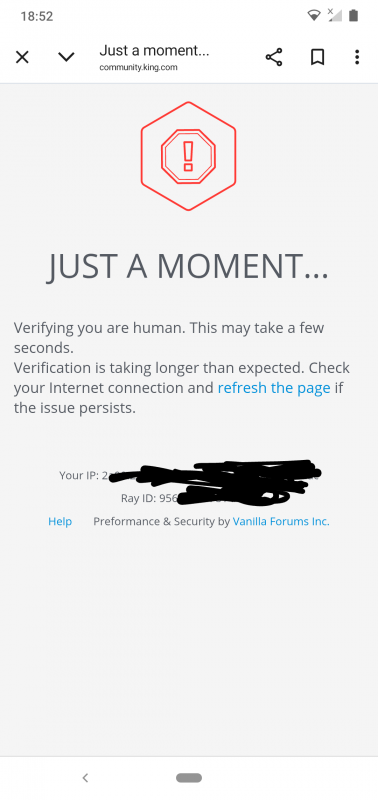
It took me ages to access the forum this evening due to the issue shown below.
Sign in or register to leave a comment and join the conversation.
Another example @FluffyDinosaur and please say when you've got enough.
Opened the Wheel of Fortune thread again as it was showing there was another post added. This time it opened it on page 3 and my draft still sitting there.
Did this on a 3rd device, this time my Huawei tablet, Android 9, Browser Chrome 138.
Back to my vacuuming 🤭
Oh and look @FluffyDinosaur just came back to this thread, and look what was showing
My same reply waiting to be posted again 🤕
And this is another example @FluffyDinosaur just opened the thread 'Chocolate Box changes again', which is currently on page 3 of Discussions, and it opened on page 14
Device used Samsung Galaxy tablet, Android version 14, Browser Chrome 150.
And just to clarify, this is a different device I used to the one in my post shown below. This device is a tablet the device in my post below was my phone.
Here is one of my examples @FluffyDinosaur. I opened the thread 'Wheel of Fortune (extra moves Spin wheel) is a bad idea' , that QueenB is collecting feedback from, this morning. I got the following, as you'll see it opened on page 2 and has a draft sitting waiting, even though I sent that post (draft) on 4th July. Each time I've opened that thread in the past, that draft has been there, so I go into my drafts and delete it, but it just appears again.
I opened this on my Samsung Galaxy phone, Android version 14, and the Browser is Chrome 150.
I'm on the PC with Google Chrome and I always have to scroll up and then go to the first page to see the latest. I often end up at the bottom and somewhere else.
So, when I read this, it's very difficult for players with a mobile device. It's driving people crazy. There's a risk that players will leave the community. There certainly weren't as many problems as there are now. Or do I see it differently? I use a PC, so I don't know. But on a PC, you don't have quite these problems.
@FluffyDinosaur
The way to recreate the not opening on page 1 for me is simple. If you go into a multi-page thread that was working correctly, through the notifications icon, it will take you a later page in the thread. From then on, the thread will no longer open on page 1. I use the edge browser on a tablet. So 1) click the notifications bell at the top of the page, 2) Click the link for a multi-page post. 3) The post no longer opens on page 1 and I haven't yet figured out how to get it working correctly again yet.
To answer your question. @FluffyDinosaur : The longest threads never open on the page with the latest posts. This includes, of course, this one. I opened it just now to see the latest posts and landed on posts dated January 2026.
The other question about the post still showing with the "post comment" box in green, after I have posted it, that is with every post I make.
Some screenshots:
As you can see on this one: The "sort by" is "newest". The thread is one of the announcement threads: Welcome to the Community! The "newest" thread, as you can see appears to be from 2022. In fact, I won't add any more screenshots, because that one says it all: If any new person joins the Welcome thread, out of all the threads in this community, they'd think no one else has joined since 2022.
I use an iPad.
Hope this helps.
So now I've posted this the comment still shows up on the page. There is no evidence I've posted it. As you can see from the screenshot below I see a post by Alienscar as "newest", but it's from January. My post doesn't show. I can only ever see my own post after posting if I reload the page. Refreshing the page does NOT work! I've just used the Safari refresh button and I still see this:
I am now posting this:
So this is the screenshot I see after posting:
This time the "newest" post is from QueenB, but still January. I still have no idea if my post got posted or not. I refresh the page and still nothing.
Still the same:
So here we are: This is what I see and I assume a lot of other people who try to navigate this forum see. I am sorry if maybe my post was posted three times and added to, but hopefully this explains to you how this happens.
Refreshing the page does NOT refresh it.
Edit two minutes later:
So now I've close down the Community page and reloaded it from Safari. I am greeted by this:
Every time I click on any thread I have commented on it says "Navigate to draft" . The only way I can get rid of this is to click on "discard reply" after I have navigated to draft.
This is what I see now after I have reloaded (rather than refreshed) the page:
My draft is still visible as a draft and I still see the "newest" comment from January 2026. It has been like this for months! I have got used to it, so I know what to do: Click on "newest" to bring up what is truly the newest post:
It's mine!!!
So now I know it's there and was posted I know that to get rid of the damn draft I have to click on "Discard Reply."
I will do that after my edit, otherwise I risk losing all the work.
Confused?
Well if you are, think of how a newbie to this community might feel about this.
As you can see on this one: The "sort by" is "newest". The thread is one of the announcement threads: Welcome to the Community! The "newest" post, as you can see appears to be from 2022. In fact, I won't add any more screenshots, because that one says it all: If any new person joins the Welcome thread, out of all the threads in this community, they'd think no one else has joined since 2022.
It's amazing what's happening here. I remember very well players who were technically skilled. As if they had professional knowledge or something. They asked for help and offered their assistance. These players were ignored. Now you come and ask for help. It's quite strange. I'm sorry, but I've been here longer and can see and assess it. I don't want to be rude. No, it's just a statement of fact.
Hi @FluffyDinosaur the main problems at the moment for a lot of us, are what I discussed, the wrong thread page number on opening, and drafts still flashing up. I know Community Managers and Moderators were/are also having these problems. So can't it be determined with what's happening to them what the main issues with the system are, and how to fix them.
You say the labels you discussed in Community News are called tags, well that's certainly going to cause confusion, with many. Don't forget there are a lot of members whose first language isn't English. I'm guessing then that you've already decided to use them, so are you doing away with the heading (title) of a post. Or is it just another gimmick to throw into the half working new forum we have at the present.
I personally don't have anymore feedback at the moment, but I do find it truly amazing that 9 months on there are still problems, that can't be fixed 🥴. I wonder if there is anyone else with technical skills, who could be contacted to have a look 🤔
Hi again Carol!
I understand it's frustrating, and it's absolutely okay if players choose to not take screenshots etc. That truly is helpful though, and will help us fix the issue quicker 🤞
For the tags, thank you for the feedback. I can get that the naming is a bit confusing, unfortunately I don't think we can change it - it's what they are called in the Forum system. But I can share this feedback along 😁
As for going back to how the Community was before October 2025, you are right, there is no way we can do so, as the old version is no longer supported. I understand that many prefer the previous layout, but this new version is in many ways a much more solid version for our Community in a lot of technical ways. That said, we will continue to improve and change the way it looks and feels for the players, so if you have more feedback on that I am more than happy to hear it!
Thank you for the response @FluffyDinosaur 👍 You are right it is repetitive keep taking screenshots, and posting every time we open a thread and it's on page 3, 4, 5, etc. Also reporting about drafts still showing, it's all very time consuming, and how many in the forum will actually bother.
You also say to share what device, browser and when it happens. Seriously, the majority are finding it difficult enough just posting in the forum, are they really going to be bothered keep checking everything that is required, and let you know. Or will they take the easier option and just give up and leave.
As for what you call 'Tags' confusing for many. I'm sure, they'll probably think your talking about @FluffyDinosaur name tag rather than labels. I'm sure you've seen my comments in Community News.
I am guessing there's no way we can just go back to how it used to be, before the October 2025 change 🤔
Oh well I think I know the answer to that, so let's see what actually happens, because I have the feeling it will be nothing 😳
Hi Carol, I'm now back from a long weekend, please keep the questions coming - I'm always happy to answer as best as I can 😁
For 1,2 I am responsible for the issue - but not the one actually solving it (as unfortunately it is a bit outside of my competency, I'd love to if I could). Both of these issue are very tricky for us to solve because we haven't been able to pinpoint what is causing it yet, or get the issue to appear consistently. What we can ask of you players in the forum, is to keep reporting it and keep sharing the details of what device and browser you use when it happens - I know it sounds repetitive but it is very helpful!
For new updates, such as the tags - we get offered to use these in the Community. Often, they are simple to turn on at the switch of a button, sometimes they require a bit more set-up. They generally do not interfere with ongoing issues, and are not worked on by the same people - which is why you will see new updates coming despite issues not being solved yet.
Hi @QueenB will FluffyDinosaur be back this week or are they away for a while. Only asking as I've asked a few questions here and there, and don't want to keep checking for replies.
Thank you 😉
I have some questions @FluffyDinosaur as there are still a few things I am confused about. Don't roll your eyes 👀, that's not nice.
First I've seen in the Community News - now you've got me looking at it - that you are thinking about adding tags (small labels) to new posts. I have already commented on that thread, so won't add it here again. But what I want to ask is:
So as I said, there are thoughts of doing more to the site, like the tags to new posts. But why aren't all the things that are wrong, taken as a priority and dealt with. This new site has been with us for 9 months now, and a lot of feedback has been given on 1 and 2 above, so as an example, how much longer should we expect to have to wait for them to be sorted.
Thank you 👍
Hi!
Do you mean this 👇️
If so, I believe this is related to the issue we are aware where posts sometimes are saved in drafts, despite having been posted. It's currently being investigated! If you mean the round "+" button, this one is not smart enough to know when something has been posted or not - it will just always be visible 🙂
@FluffyDinosaur Why is the Post Comment button still active after I have posted a comment. This is really confusing.
Yes @FluffyDinosaur it looks like you have fixed the issue.
The green + now appears on all the boards other than the Contests board and it no longer disappears as I move from board to board.
Unlike the Discussion and Candy Corner boards there is still no + when I open a Support thread though.
Not sure if that is much of an issue though.
The Contests board does not have a + at all, but I guess it doesn't really need one.