Best Of
Booster panel too big and blocking game board - Edited by CM: Reported to the Studio!
I’m struggling to play on iPad Pro as the icons at the bottom take up a large part of the screen so i can’t see the bottom of the game. Anyone help??
Update by CM 28th May:
We are aware that in the recent updates some of you that are playing on iPads (other devices can also be affected) are having issues where the booster panel is overlapping/blocking the bottom of the game board.
This has been reported and the team is working on solving this as soon as possible.
If your game has been affected, please leave a comment and let us know which device you are playing on so we can share this with the team to help with the investigation!

Re: Booster panel too big and blocking game board - Edited by CM: Reported to the Studio!
Has anybody noticed a change on their levels. Where the hammer hand swap etc has suddenly gone large. This has only just happened on PC. Ipad is still small
Re: Booster panel too big and blocking game board - Edited by CM: Reported to the Studio!
Hi @lorraineq12
Thanks for sharing this! Just wanted to check something, the new Booster panel being too big, is it overlapping and blocking game board?

Re: Booster panel too big and blocking game board - Edited by CM: Reported to the Studio!
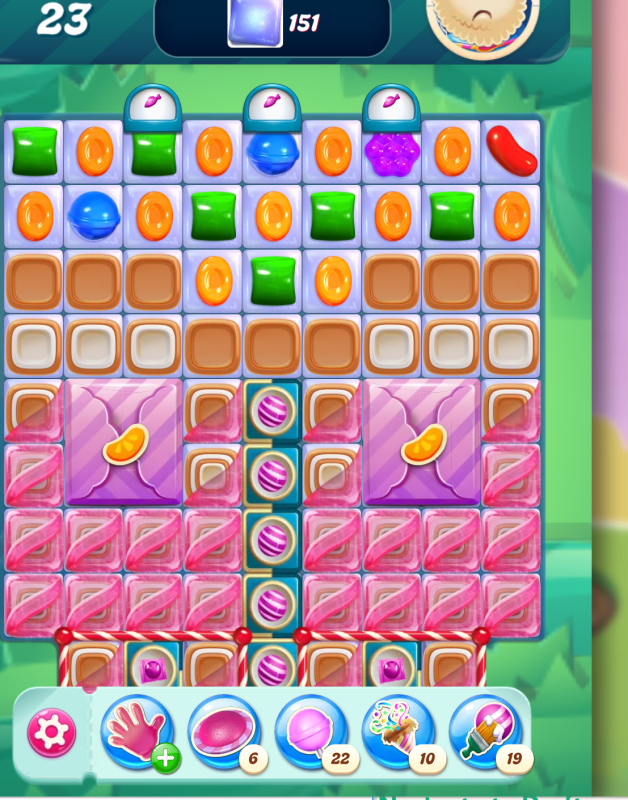
Thanks for your reply. Yes it is overlapping the bottom by about a 1/4 inch. The previous panel was standalone but this is included in the blockers
Re: Booster panel too big and blocking game board - Edited by CM: Reported to the Studio!
hope you can see this
Re: Booster panel too big and blocking game board - Edited by CM: Reported to the Studio!
Hi @lorraineq12
Thank you for the screenshot, that helps a lot.
I can see what you mean now. The Booster panel is sitting too low and overlapping the bottom part of the game board.
I’ve shared this with the Studio, and they’re already aware of the issue and working on a fix.
Thanks again for helping us with the extra details 😉